
Japanese text recognition
Japanese OCR online: text from images, photos and PDFs, vertical text included
Drop an image, paste a screenshot, take a photo or add a PDF. Every block of Japanese comes back as editable text in reading order, with readings over the kanji and an optional translation beside it.
- Vertical columns right to left
- Phone camera with de-skew
- Copy, TXT or DOCX
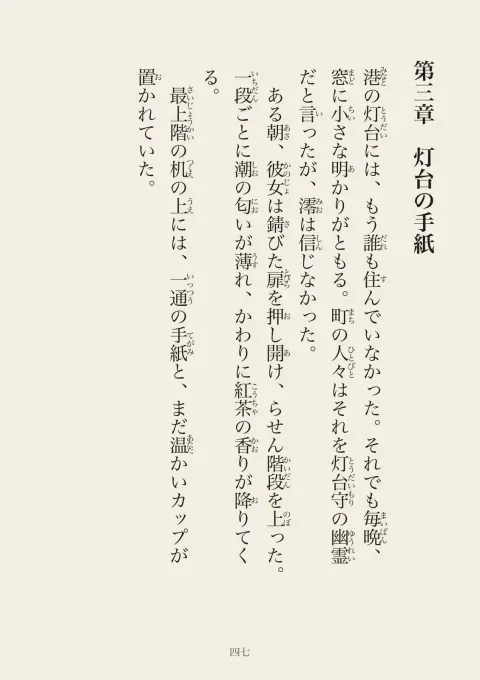
1第三章 灯台の手紙
Chapter Three: The Lighthouse Letter
2港の灯台には、もう誰も住んでいなかった。それでも毎晩、窓に小さな明かりがともる。町の人々はそれを灯台守の幽霊だと言ったが、澪は信じなかった。
No one lived in the harbor lighthouse anymore. Even so, every night, a small light would flicker in the window. The townspeople said it was the ghost of the lighthouse keeper, but Mio didn't believe it.
3ある朝、彼女は錆びた扉を押し開け、らせん階段を上った。一段ごとに潮の匂いが薄れ、かわりに紅茶の香りが降りてくる。
One morning, she pushed open the rusty door and climbed the spiral staircase. With every step, the smell of the tide faded, and in its place, the aroma of black tea drifted down.
4最上階の机の上には、一通の手紙と、まだ温かいカップが置かれていた。
On the desk on the top floor, a single letter and a still-warm cup had been placed.
Drop a page with Japanese on it
An image, a screenshot from the clipboard, a phone photo or a PDF. JPG, PNG or WebP up to 10 MB.
Add a page to see the price.
New accounts get 7 free credits after confirming their email.
Read by Gemini 3 Flash. Crop, clean-up, readings and export are free.
Uploads are private and deleted after 7 days. Your text stays in your history until you delete it.
Real runs
Image to Japanese text, on pages we wrote ourselves
Each page was read once by this tool; the blocks and their numbers are exactly what came back. Hover a block to find it on the page.
1第三章 灯台の手紙
2港の灯台には、もう誰も住んでいなかった。それでも毎晩、窓に小さな明かりがともる。町の人々はそれを灯台守の幽霊だと言ったが、澪は信じなかった。
3ある朝、彼女は錆びた扉を押し開け、らせん階段を上った。一段ごとに潮の匂いが薄れ、かわりに紅茶の香りが降りてくる。
4最上階の机の上には、一通の手紙と、まだ温かいカップが置かれていた。
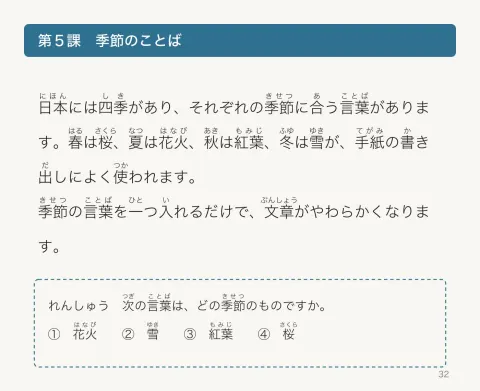
1第5課 季節のことば
2日本には四季があり、それぞれの季節に合う言葉があります。春は桜、夏は花火、秋は紅葉、冬は雪が、手紙の書き出しによく使われます。
3季節の言葉を一つ入れるだけで、文章がやわらかくなります。
4れんしゅう 次の言葉は、どの季節のものですか。
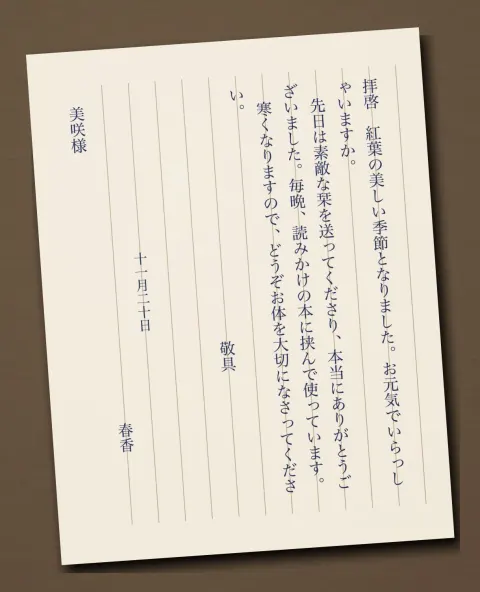
1拝啓 紅葉の美しい季節となりました。お元気でいらっしゃいますか。
2先日は素敵な栞を送ってくださり、本当にありがとうございました。毎晩、読みかけの本に挟んで使っています。
3寒くなりますので、どうぞお体を大切になさってください。
4敬具
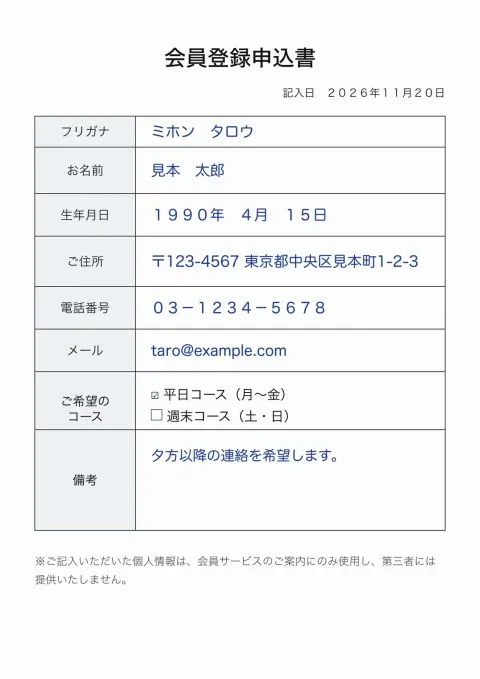
1会員登録申込書
2記入日 2026年11月20日
3フリガナ
4ミホン タロウ
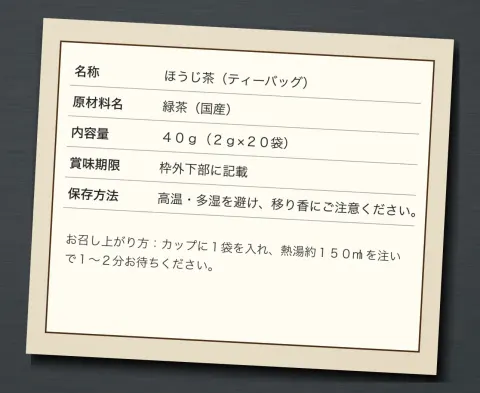
1名称
2ほうじ茶(ティーバッグ)
3原材料名
4緑茶(国産)
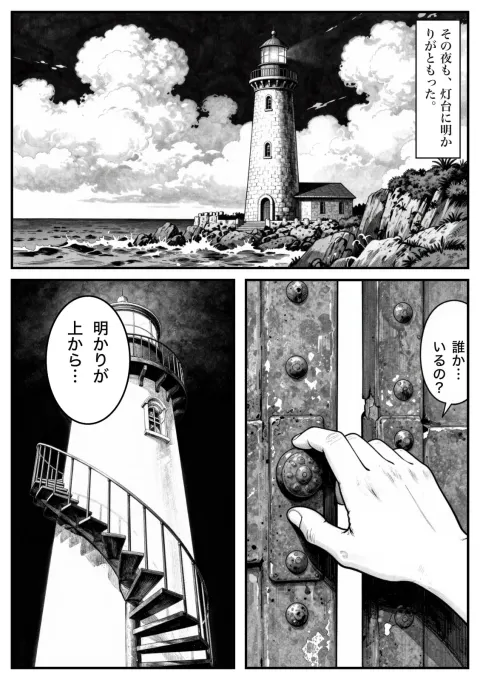
1その夜も、灯台に明かりがともった。
2誰か…いるの?
3明かりが上から…
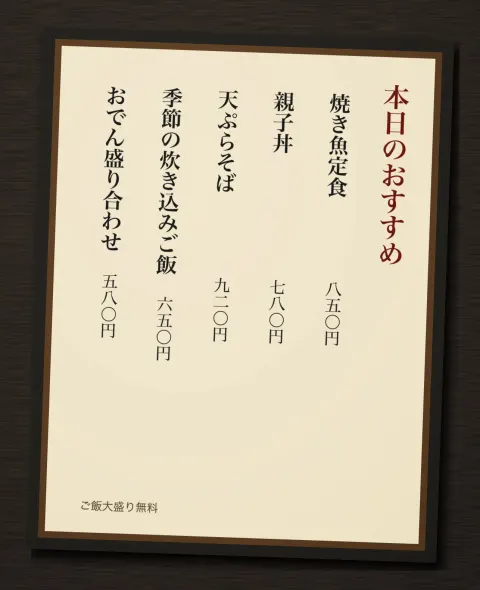
1本日のおすすめ
2焼き魚定食 八五〇円
3親子丼 七八〇円
4天ぷらそば 九二〇円
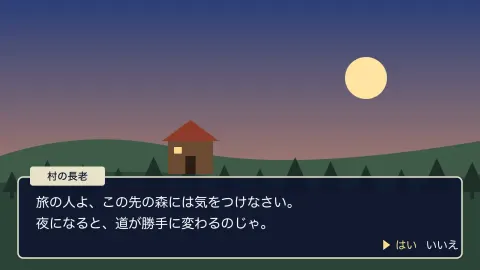
1村の長老
2旅の人よ、この先の森には気をつけなさい。夜になると、道が勝手に変わるのじゃ。
3▶ はい いいえ
Built for Japanese
What makes Japanese text recognition hard, handled
General OCR tools treat Japanese as one more language. These are the parts that need care.
Reading order that makes sense
Vertical columns are read right to left, then headings, captions and side notes are placed where they sit. Each block is numbered on the page so you can check it.
Readings your way
Small kana printed beside kanji are kept as readings. Show them over the kanji, put them in brackets for flashcards, or drop them for clean text.
Photos that read like scans
Take a picture with your phone; crop to the part you need, lift contrast and straighten a tilted shot in the browser before it is read.
PDFs, page by page
Scanned PDFs up to 20 pages are drawn in your browser and read one page at a time, priced per page before you start.
Text you can use
Edit any block in place, copy one or all, or download a TXT file or a DOCX with one page per page of your document.
Meaning beside the Japanese
Turn on translation to get each block in English or six other languages under the original, and re-translate one block with a note.
Start here
Three ways in
Each page opens the reader set up for the job.
How it works
How to turn an image into Japanese text
Three steps for one page or a 20-page PDF.
- 1
Add the page
Drop an image, paste a screenshot, use your phone camera or add a PDF. Pages stay private and are deleted after 7 days.
- 2
Set it up
Crop if you only need part of it, pick the layout or leave it on Auto, and turn on translation if you want the meaning. The price shows before you run.
- 3
Read, fix and export
Check each numbered block against the page, edit what needs it, choose how readings show, then copy or download TXT or DOCX.
Credits
What each step costs
Pages are read by Gemini 3 Flash. Every price is per page, whether it is a photo, a screenshot or one page of a PDF.
| Step | Credits |
|---|---|
| Re-translate one block with a note | 2 |
| Read one page to text | 7 |
| Read one page and translate it | 12 |
| Crop, clean-up, readings, copy, TXT and DOCX | 0 |
Credits are only kept for pages that finish; a page that fails is refunded automatically.
Pricing
Plans for one reader or a whole study group
Three personal plans, two team plans with seats, and a credit pack. New accounts get 7 free credits once: one page read to text (7 credits).
Cancel when you like · 14-day money-back window
Full Page
Recommended2,875 credits a month, about 410 pages read to text
$11.95/month
Billed monthly, cancel anytime
2,875credits a month
- ≈ 410 pages to text
- ≈ 239 with translation
Plans open soon.
- Six at a time in the queue
- PDFs up to 20 pages per upload
- Copy, TXT and DOCX export
- API keys and MCP from scripts
Plans open soon.
Priced per seat, 3 seats minimum. All seats feed one credit pool; teammates join from an invite link.
Reading Room
Recommended2,189 credits a month per seat, in one shared pool
$8.79per seat a month
Billed monthly, cancel anytime3 seats: $26.37 in total
2,189credits a month per seat
- ≈ 312 pages to text
- ≈ 182 with translation
Plans open soon.
- One shared credit pool for the team
- Six at a time in the queue
- PDFs up to 20 pages per upload
- Copy, TXT and DOCX export
- API keys and MCP from scripts
- Credit cap per member
Plans open soon.
Full Page
Recommended2,875 credits a month, about 410 pages read to text
$11.95$9.96/month
$119.50 billed once a year · or $11.95 billed monthly
2,875credits a month
- ≈ 410 pages to text
- ≈ 239 with translation
Plans open soon.
- Six at a time in the queue
- PDFs up to 20 pages per upload
- Copy, TXT and DOCX export
- API keys and MCP from scripts
- 34,500 credits a year, 2,875 added each month
Plans open soon.
Priced per seat, 3 seats minimum. All seats feed one credit pool; teammates join from an invite link.
Reading Room
Recommended2,189 credits a month per seat, in one shared pool
$8.79$7.21per seat a month
$86.55 per seat a year · or $8.79 per seat billed monthly3 seats: $259.65 in total
2,189credits a month per seat
- ≈ 312 pages to text
- ≈ 182 with translation
Plans open soon.
- One shared credit pool for the team
- Six at a time in the queue
- PDFs up to 20 pages per upload
- Copy, TXT and DOCX export
- API keys and MCP from scripts
- Credit cap per member
Plans open soon.
Box File
A stock of credits for one big job, no subscription
6,460credits
$31.89one-time
Credits never expire.
- ≈ 922 pages to text
- ≈ 538 with translation
Plans open soon.
Plans open soon.
Free: 7 credits once, added when you confirm your email, no card needed. That is one page read to text, ready to copy or download. One grant per mailbox. They never expire.
Money back within 5 days of a monthly charge, 14 days of a yearly one or 10 days of a pack, while at most 10% of its credits are spent; you get the unspent share back.
Questions about Japanese OCR
What is AIMangaTranslator?
AIMangaTranslator is Japanese OCR in the browser. You add an image, a screenshot, a phone photo or a PDF, and every block of Japanese on it comes back as editable text in reading order, with readings over the kanji and, if you want, a translation beside each block. Manga and light-novel pages work too, but so do letters, forms, packaging and textbooks.
Is it free to try?
New accounts get 7 credits once, added when the email address is confirmed; that covers one page read to text (7 credits), which you can copy or download. After that, plans and a credit pack are on the pricing page.
Which AI model reads the pages?
Pages are read and translated with Gemini 3 Flash, a Google model. Cropping, contrast, de-skew, PDF page drawing, readings and TXT or DOCX export all run in your browser.
Does it handle vertical Japanese text?
Yes. Vertical columns are read from right to left and top to bottom, as in a printed book, and horizontal headings or captions are placed where they sit. Pick Vertical, Horizontal or Mixed if Auto gets a page wrong.
What happens to furigana?
Small readings printed beside kanji are kept with the word they belong to. Show them over the kanji, write them in brackets after it, or hide them; the choice applies to copying and to TXT and DOCX exports.
Can it read PDFs and phone photos?
Yes. PDFs up to 20 pages are drawn as images in your browser and read page by page. Phone photos can be cropped, straightened and lifted in contrast before they are read. Text that is already selectable in a PDF can simply be copied from your viewer.
Who can see my uploads and text?
Only you; on a team plan the owner sees usage, not your pages. There is no public gallery. Uploaded images are deleted automatically after 7 days, and the extracted text stays in My documents until you delete it.
What happens if a page fails?
Credits are taken when a page starts. If it errors or times out, they go back to your balance automatically and the page stays in the reader so you can run it again.
Can it read handwriting?
Neat handwriting often reads well, but it is best effort. Blocks the reader is unsure about are outlined with a dashed line and marked so you know to check them.
Which languages can it translate into?
English, Chinese, Spanish, Portuguese, French, German and Korean. Translation is optional: without it you get only the Japanese text and readings, for fewer credits.
Is this an official Google or publisher website?
No. AIMangaTranslator is an independent service, not affiliated with Google, any publisher or any manga app. It runs Gemini 3 Flash for you and charges credits for each page read. Gemini is a trademark of Google LLC; other names are trademarks of their respective owners.
Updated
Have a page of Japanese to copy?
Drop it in and get editable text back in reading order.