Japanese camera translator: photo to Japanese text, reading and meaning

Point the camera, get the Japanese text, its reading and its meaning as text. Take a photo of a letter, a form, a notice or a label with your phone, and the reader straightens it, pulls out every block of Japanese in reading order with readings over the kanji, and puts a translation into your language beside each block. Unlike an overlay that disappears when you move the phone, the result stays in your history to copy, edit or download.

Updated

Page 1 with each text block outlined
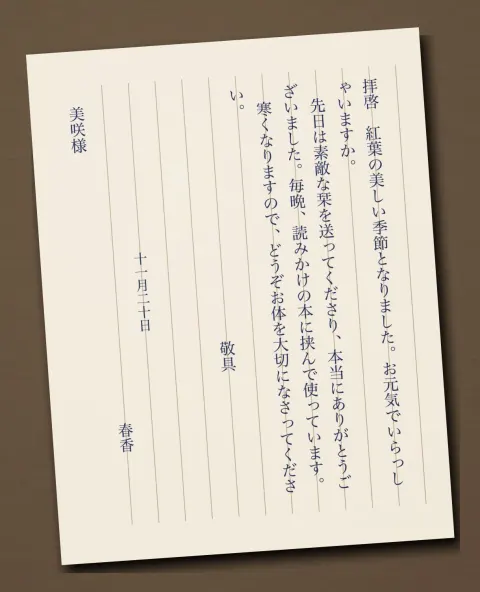
  1. Dear Misaki, the season of beautiful autumn leaves has arrived. How have you been?

  2. Thank you so much for sending me the lovely bookmark the other day. I use it every night, tucked into the book I'm currently reading.

  3. It's getting colder, so please take good care of yourself.

  4. Sincerely,

Real run: A photographed handwritten-style Japanese letter in vertical columns
Layout

Drop a page with Japanese on it

An image, a screenshot from the clipboard, a phone photo or a PDF. JPG, PNG or WebP up to 10 MB.

Add a page to see the price.

New accounts get 7 free credits after confirming their email.

Read by Gemini 3 Flash. Crop, clean-up, readings and export are free.

Sign up free: 7 credits to start

Uploads are private and deleted after 7 days. Your text stays in your history until you delete it.

How it works

  1. 1

    Take the photo

    Tap Camera on your phone and shoot the page flat-on in good light. Contrast and de-skew turn on automatically for camera shots; you can crop to one part before reading.

  2. 2

    Pick your language

    Translation is on, set to your interface language. Choose another from the list, or turn it off to get only the Japanese.

  3. 3

    Read it back

    Each block shows the Japanese with readings, then its meaning. Tap a block to find it on the photo, copy it, or re-translate it with a note such as "formal letter".

Good for

  • Letters and notices from a landlord, a school or the city office
  • Product labels, instructions and ingredient lists on packaging
  • Forms you have to fill in and want to understand first
  • Signs and posters you want to keep as text, not just glance at

Real runs

Page 1 with each text block outlined
  1. Dear Misaki, the season of beautiful autumn leaves has arrived. How have you been?

  2. Thank you so much for sending me the lovely bookmark the other day. I use it every night, tucked into the book I'm currently reading.

  3. It's getting colder, so please take good care of yourself.

  4. Sincerely,

Real run: A photographed handwritten-style Japanese letter in vertical columns
Page 1 with each text block outlined
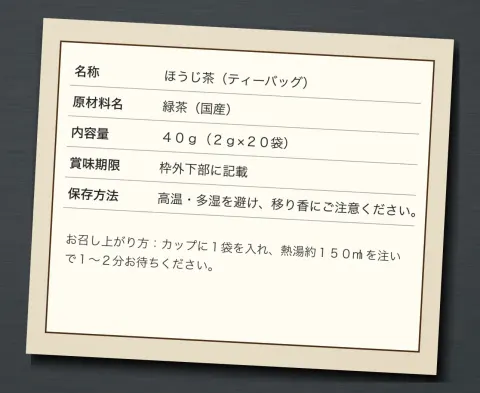
  1. Product Name

  2. Hojicha (Tea Bags)

  3. Ingredients

  4. Green tea (Domestic)

Real run: A photographed Japanese food label: name, ingredients, weight and storage
Page 1 with each text block outlined
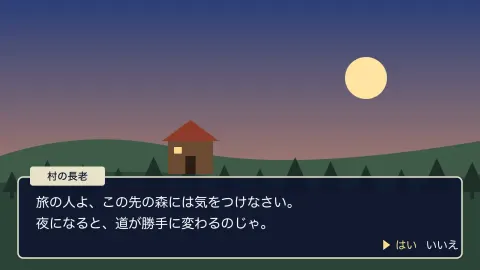
  1. Village Elder

  2. Traveler, be careful in the forest ahead. When night falls, the paths change on their own.

  3. ▶ Yes No

Real run: A game screenshot with a Japanese dialogue box and answer choices

01

Text you keep, not a passing overlay

Live-view camera apps paint a translation over the screen, and the words vanish once you lower the phone. You cannot copy them into a reply or a dictionary. Here the photo becomes a page in your history: the Japanese as characters you can select, the readings, and the translation, block by block. Open it again next week, fix a word, export it as a document for someone who helps you with paperwork.

02

Readings and meaning together

Each block keeps its kanji with the reading in kana above them, so you can say the words aloud or look them up. Switch the display to readings in brackets, or hide them. The translation sits under the Japanese rather than replacing it, which makes it easy to see which phrase means what, and to spot a name or a date the translation should not change.

03

Getting a clean shot

Hold the phone parallel to the page, fill the frame with the text, and avoid a lamp reflecting in glossy paper. A slight tilt is corrected by de-skew; strong curves, as in a thick book near the spine, read better if you press the page flat. Crop to the part you need when the photo holds more than one document.

Credits per page

The reader shows the exact cost before you run anything. Plans and credit packs

Prices run from $4.45 for the smallest monthly plan to $204.90 for a year of the largest.

StepCredits
Re-translate one block with a note2
Read one page to text7
Read one page and translate it12
Crop, clean-up, readings, copy, TXT and DOCX0

Questions

Does it work live, like an overlay?

No. You take a photo and get the text back in a few seconds. The point is a result you can keep, copy and export, with the readings and the meaning next to the original.

Which languages can it translate into?

English, Chinese, Spanish, Portuguese, French, German and Korean. You can also skip translation and only get the Japanese text with its readings.

Is the photo stored?

The photo is kept privately for 7 days so you can see it next to the text, then it is deleted automatically. The text stays in your history until you delete it.

Can it read handwriting?

Neat handwriting often reads well, but it is best effort. Blocks the reader is unsure about are marked so you know to check them.

What does a photo cost?

A photo with translation costs the credits shown on the button before you run it; without translation it costs less. Changing how readings show, copying and exporting are free.