Japanese PDF OCR: scans and vertical text to copyable text

Japanese PDF OCR without installing anything: add a scanned or image-only PDF, and each page is drawn in your browser, read block by block in Japanese reading order, and returned as text you can edit. Vertical columns run right to left, headings and captions keep their place, and the whole file downloads as one document with a page break between pages.

Updated

Page 1 with each text block outlined
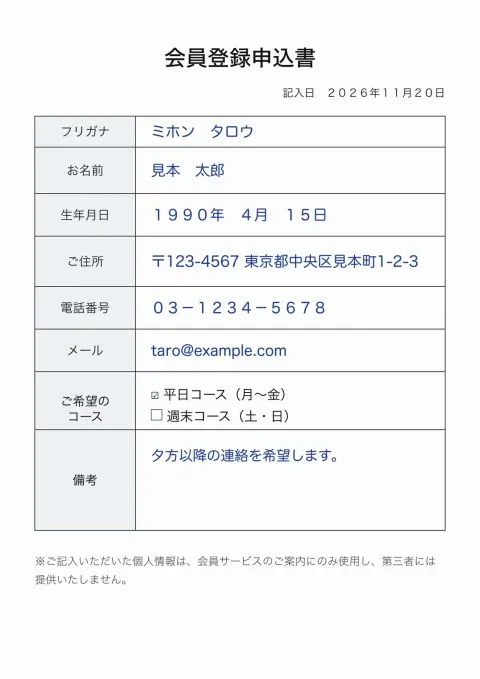
  1. Membership Registration Application Form

  2. Date of entry: November 20, 2026

  3. Furigana

  4. Mihon Taro

Real run: A filled-in Japanese membership form, each label and entry read separately
Layout

Drop a page with Japanese on it

An image, a screenshot from the clipboard, a phone photo or a PDF. JPG, PNG or WebP up to 10 MB.

Add a page to see the price.

New accounts get 7 free credits after confirming their email.

Read by Gemini 3 Flash. Crop, clean-up, readings and export are free.

Sign up free: 7 credits to start

Uploads are private and deleted after 7 days. Your text stays in your history until you delete it.

How it works

  1. 1

    Add the PDF

    Up to 40 MB. The first 20 pages are drawn as images in your browser, so the file itself never leaves your device; only the page images you read are uploaded.

  2. 2

    Check the pages

    Every page shows in the strip with its price before anything runs. Remove pages you do not need, crop one to a column, and turn on de-skew for a crooked scan.

  3. 3

    Read and export

    Pages are read one after another. Correct any block in place, then copy everything or download TXT or DOCX; a page that fails is refunded and can be run again.

Good for

  • Scanned textbooks, handouts and printed reports that only exist as images
  • Old PDFs of novels, essays or articles typeset in vertical columns
  • Forms and letters you need as editable text for a translator or a records system
  • Pulling a few pages out of a long scan to quote or look words up

Real runs

Page 1 with each text block outlined
  1. Membership Registration Application Form

  2. Date of entry: November 20, 2026

  3. Furigana

  4. Mihon Taro

Real run: A filled-in Japanese membership form, each label and entry read separately
Page 1 with each text block outlined
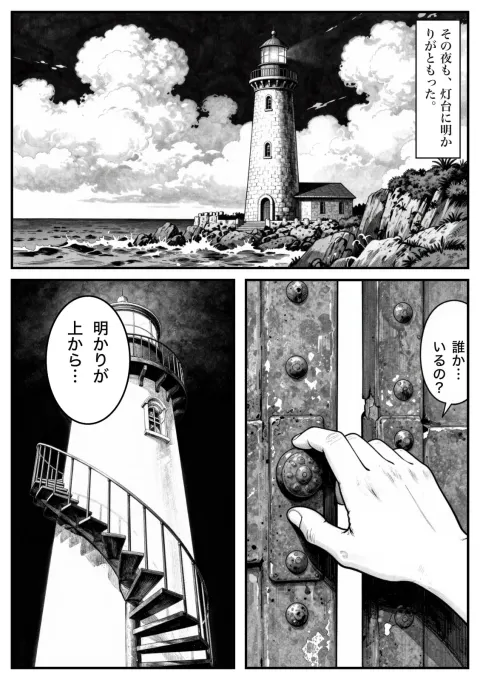
  1. That night, too, the light in the lighthouse was lit.

  2. Is... someone there?

  3. The light is coming from above...

Real run: A black-and-white comic page with vertical speech balloons and a caption

01

Why a scanned PDF has no text to copy

A scanner saves a picture of each page. The PDF viewer can show it, but there are no characters inside to select, search or paste. OCR looks at that picture and writes the characters back out. Japanese makes this harder than most languages: thousands of kanji, kana that differ by a single stroke, small readings printed beside words, and pages that run in columns from the right. The reader here is set up for exactly that, so a page of a vertical paperback comes back in the order a person would read it.

02

One document out, page breaks kept

Every page of the file is its own job, priced the same as a single image. When the run is done, the DOCX download is one file with each PDF page on its own page in the same order, and the TXT download separates pages with a form-feed line, so a script or a word processor can split them again. Furigana can be written as ruby notation, put in brackets after the kanji, or left out before you export.

03

Where it struggles

Low-resolution faxes, heavy stamps and handwriting are read on a best-effort basis. Blocks the reader is unsure about get a dashed outline, so you know where to look. Text that is already selectable in a PDF does not need OCR at all: copy it straight from the viewer. Searchable-PDF output is not offered; the result is plain text or a Word document.

Credits per page

The reader shows the exact cost before you run anything. Plans and credit packs

Prices run from $4.45 for the smallest monthly plan to $204.90 for a year of the largest.

StepCredits
Re-translate one block with a note2
Read one page to text7
Read one page and translate it12
Crop, clean-up, readings, copy, TXT and DOCX0

Questions

How many pages can one PDF have?

Files up to 40 MB are accepted and the first 20 pages are read; split longer files and add them one after another. Each page costs the same credits as one image and the total shows before you start.

Is the PDF uploaded?

No. The pages are drawn as images in your browser, and only the page images you choose to read are uploaded. Those images are deleted automatically after 7 days; the text stays in your account until you delete it.

Does it keep vertical text in order?

Yes. Vertical columns are read right to left and top to bottom, then horizontal text such as headings and captions is placed where it sits on the page. Each block is outlined on the page image so you can check the order.

Can I get a searchable PDF back?

No, the output is editable text: copy it, or download a TXT file or a DOCX with one page per PDF page.

What happens if a page fails?

Its credits are refunded automatically and the page stays in the strip, so you can run it again on its own.